Derby RFC is moving from membership payment via Love Admin to payments via GMS. This means players and parents of players will only need to have details entered and maintained in one system. It will also allow team managers to check the payment status of their squad more easily. Please follow the relevant instructions below:
Buying an Adult Membership
- Go to the Memberships menu item on the website https://derbyrfc.rfu.club/products where a selection of Available Memberships will be shown. On the website some of those shown may not be available for you to buy, but click on “Purchase” on the top right of the page and you will be taken to your GMS login and once into GMS you will be presented with those that are applicable to you based on age and gender. (On the website you can also click on any Membership shown and it will provide more information about that membership.)
- In GMS click on “Add to Basket” for the appropriate Membership (if you are also buying a child’s membership see below section). If you have selected “Sponsored Player” there is no payment process to go through, however your membership will go into an ”Awaiting Approval” state. Please make sure the Derby RFC Sponsorship Team has been made aware of your sponsorship and updated their records so that the approval can be given.
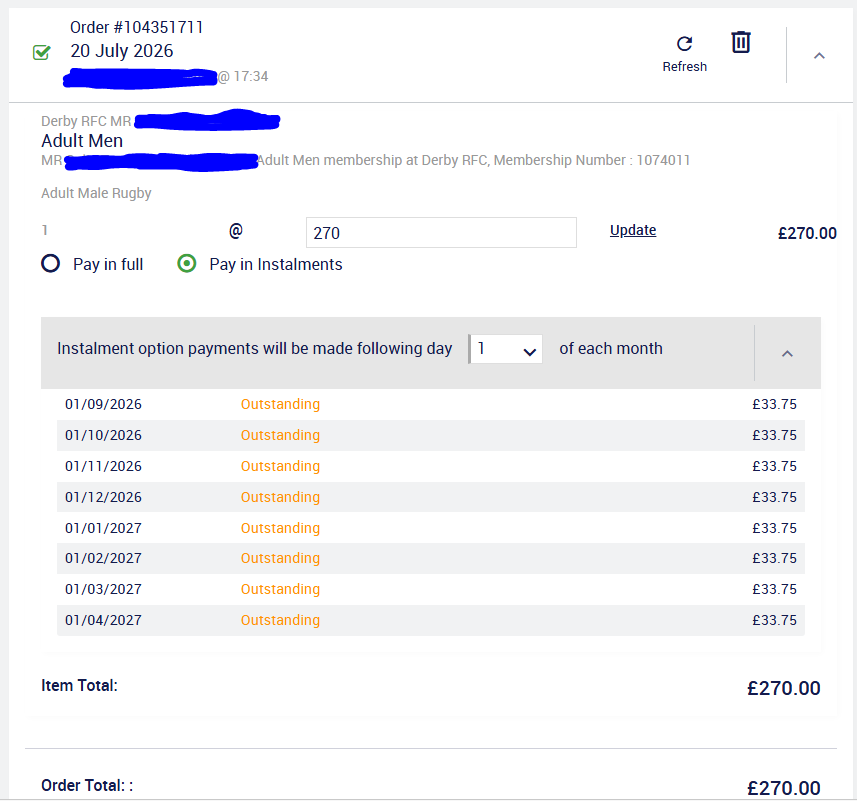
- Click on “Basket” and in the page that appears you have the opportunity to toggle between paying by instalments and in full. See example at the bottom of this page. In both cases payment is made against the card details you provide on the right-hand side of the page, there is no direct debit to set up. Instalment payments will start on 1st September but will “settle” into the club’s account on 15th I believe that “in full” payments are taken straight away (but will settle on 1st or 15th of the month). Check address details and click on “Pay Now” to provide your card details securely and follow the normal process for on-line payments that your bank utilises.
Buying a Membership for your child
- Go to the Memberships menu item on the website https://derbyrfc.rfu.club/products where a selection of Available Memberships will be shown. On the website some of those shown may not be available for you to buy for your child, but click on “Purchase” on the top right of the page and you will be taken to your GMS login. Once there, please switch to your child’s account and then you will be presented with those that are applicable to your child based their age and gender. (On the website you can also click on any Membership shown and it will provide more information about that membership.)
- In GMS click on “Add to Basket” against the appropriate membership.
- If you have another child to buy membership for, switch to the other child’s account and repeat the above (so you should have 2 items in the basket). Buying both children’s membership in one order will ensure that you get the SIBLING DISCOUNT automatically applied.
- Click on “Basket” and in the page that appears you have the opportunity to toggle between paying by instalments and in full. See example at the bottom of this page. (If you have bought memberships for 2 children you should see that a £25 discount has been applied to one of them.) In both cases payment is made against the card details you provide on the right-hand side of the page, there is no direct debit to set up. Instalment payments will start on 1st September but will “settle” into the club’s account on 15th I believe that “in full” payments are taken straight away (but will settle on 1st or 15th of the month). Check address details and click on “Pay Now” to provide your card details securely and follow the normal process for on-line payments that your bank utilises.